UTM Tracking for Email Marketing: A GA4 Guide for Newsletters and Campaigns

Email marketing can drive website visits, leads, registrations and sales, but knowing that someone came from an email is only the beginning.
To understand which newsletter, promotion, campaign or link generated that visit, marketers can use UTM parameters.
For example:
https://example.com/sale?utm_source=mailchimp&utm_medium=email&utm_campaign=summer_sale
This URL gives Google Analytics additional campaign information that can be used in traffic-source and campaign reporting.
With the GetToolara UTM Builder, you can create these trackable campaign URLs without manually assembling every parameter.
UTM parameters don't measure email opens. They identify campaign information attached to a URL when someone clicks the tagged link and reaches your website. For most email campaigns, start with: utm_source + utm_medium + utm_campaign Then add utm_content when you need to distinguish multiple links or creatives.
What Is UTM Tracking for Email Marketing?
UTM tracking is the practice of adding campaign parameters to URLs so analytics platforms can identify the marketing source, medium and campaign associated with website traffic.
For email marketing, a basic tagged URL could look like:
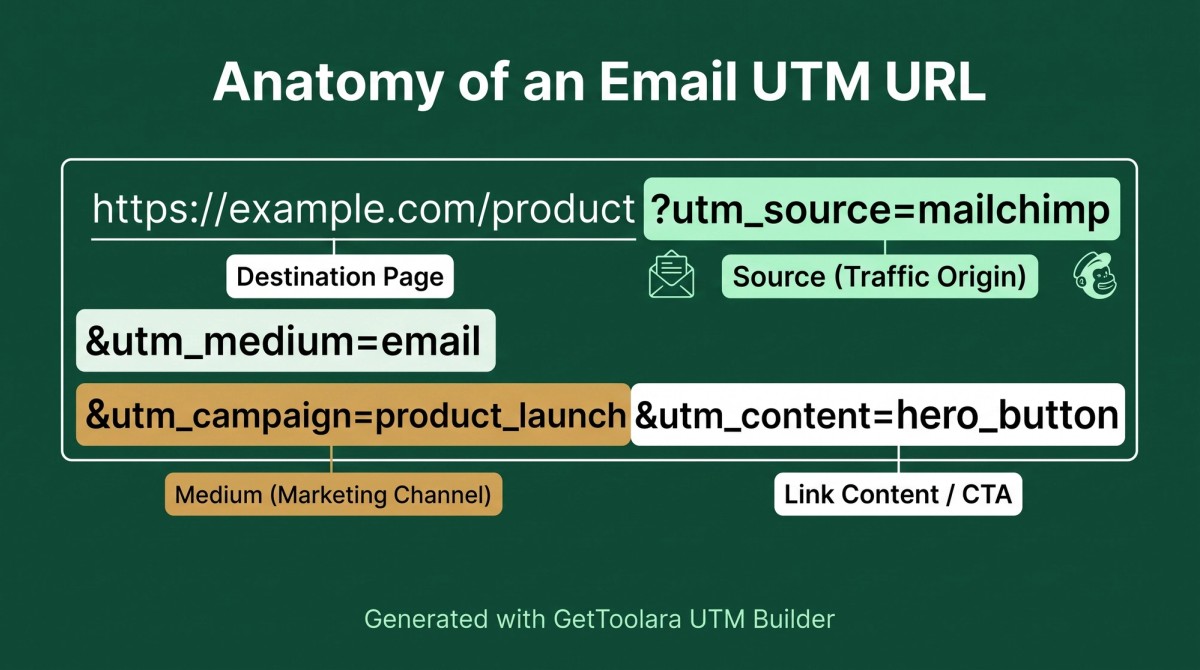
https://example.com/product?utm_source=mailchimp&utm_medium=email&utm_campaign=product_launch
In this example:
- utm_source=mailchimp identifies the email platform or source
- utm_medium=email identifies the marketing channel
- utm_campaign=product_launch identifies the campaign
Google Analytics processes these UTM parameters into traffic-source and campaign dimensions. Google recommends using consistent campaign parameters so marketing data remains meaningful and easier to analyse.
The GetToolara UTM Builder can simplify the URL creation process by generating the tagged link for you.
Why Is Email UTM Tracking Important?
A normal URL such as:
https://example.com/pricing
doesn't tell your analytics system which email campaign you intended to associate with the click.
A tagged URL can provide additional campaign context:
https://example.com/pricing?utm_source=weekly_newsletter&utm_medium=email&utm_campaign=september_offer
This allows marketers to analyse campaign traffic using dimensions such as source, medium and campaign.
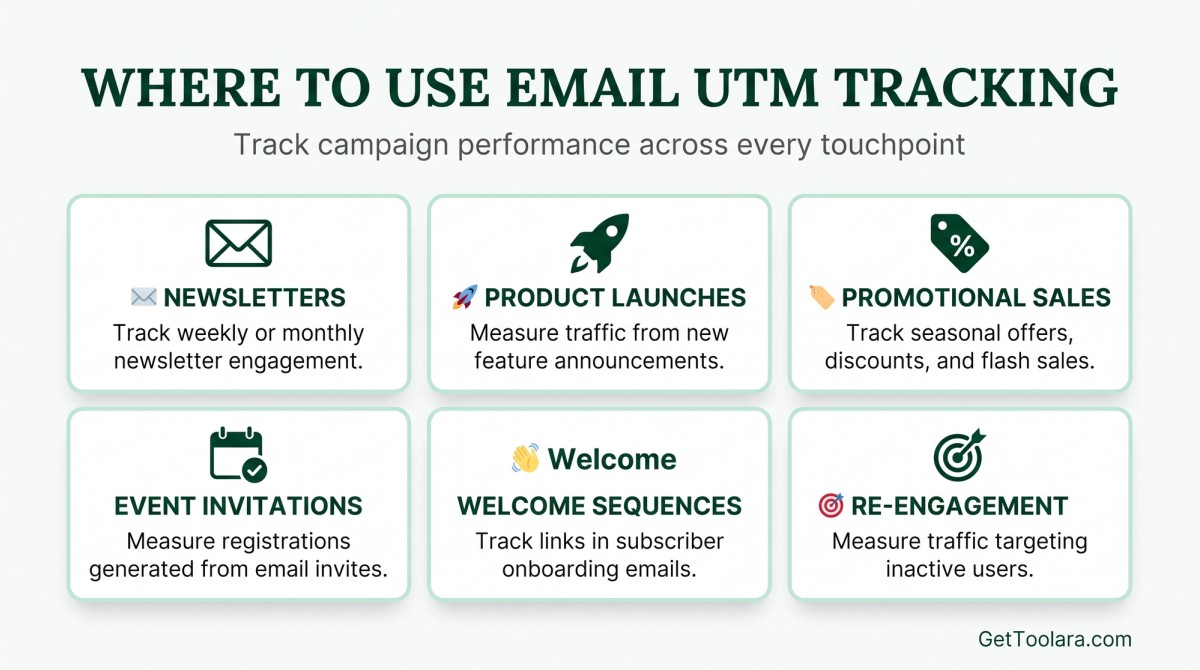
Email UTM tracking can help you:
- Identify traffic generated by email campaigns
- Compare different newsletters
- Distinguish different promotions
- Track campaign-specific landing pages
- Compare campaign traffic in GA4
- Differentiate links within the same email
- Maintain consistent marketing attribution
- Build cleaner campaign reports
The 3 Core UTM Parameters for Email
For most email campaigns, three parameters provide a solid starting point:
utm_source utm_medium utm_campaign
Let's examine each one.
1. utm_source
The source identifies the specific platform, website, app or online location associated with the traffic.
Google's current traffic-source documentation gives examples such as google, facebook.com, and spring_newsletter as source values.
For email marketing, useful source values might include:
utm_source=mailchimp
or:
utm_source=klaviyo
or:
utm_source=weekly_newsletter
The best choice depends on what you want your reports to communicate.
A useful rule
Source = Where specifically did the traffic come from?
Medium = What type of marketing channel was it?
So:
utm_source=mailchimp utm_medium=email
is often more informative than:
utm_source=email utm_medium=email
However, utm_source=email&utm_medium=email is not automatically invalid in GA4. Google's current Default Channel Grouping can classify traffic into Email when either the source or medium matches its email rules. The recommendation here is about better campaign organisation and reporting, not a claim that GA4 will automatically classify source=email as Unassigned.
2. utm_medium
The medium identifies the broader marketing channel.
For email campaigns, use:
utm_medium=email
This is particularly important because GA4's default Email channel includes traffic where the medium is email (along with several equivalent source/medium values).
Recommended email structure
utm_source=mailchimp utm_medium=email utm_campaign=summer_sale
Think of it this way:
Source: Mailchimp
Medium: Email
Campaign: Summer Sale
That gives your reporting a much clearer hierarchy.
3. utm_campaign
Campaign identifies the specific marketing initiative.
Examples:
utm_campaign=summer_sale
utm_campaign=product_launch
utm_campaign=black_friday
utm_campaign=september_newsletter
Campaign names are your organisation's naming choice. The important thing is to create a system that your team can apply consistently.
What About utm_content?
utm_content is useful when you want to distinguish different links or creative elements within the same campaign.
Imagine an email contains:
- Hero image
- Shop Now button
- Text link
You could use:
utm_content=hero_image
utm_content=shop_now
utm_content=text_link
The other parameters can remain identical:
utm_source=mailchimp utm_medium=email utm_campaign=summer_sale
Only the content value changes.
Google maps campaign content into its campaign-content traffic-source dimension, so it can be useful for analysing different tagged links or creative variations.
What About utm_term?
utm_term is traditionally associated with paid search keywords, but it is also available as a campaign parameter.
For a normal newsletter, you generally don't need utm_term unless you have a specific reporting reason to use it.
Don't add parameters simply because a UTM builder provides them.
A good tracking system is not the one with the most parameters.
It's the one with the most useful and consistently maintained parameters.
Email UTM URL Example
Suppose you're promoting a new product through Mailchimp.
Your destination URL is:
https://example.com/new-product
Your campaign structure is:
Parameter
Value
Source
mailchimp
Medium
Campaign
product_launch
Content
hero_button
Your final URL becomes:
https://example.com/new-product?utm_source=mailchimp&utm_medium=email&utm_campaign=product_launch&utm_content=hero_button
You can create this URL using the GetToolara UTM Builder instead of manually typing each parameter.
How to Create a UTM Link for Email Marketing
You can manually build UTM URLs, but using a dedicated UTM builder makes the process easier and more repeatable.
Here's a practical workflow using the GetToolara UTM Builder.
Step 1: Enter Your Destination URL
Start with the page you want subscribers to visit.
For example:
https://example.com/summer-sale
This could be:
- Product page
- Landing page
- Pricing page
- Blog article
- Event registration page
- Contact page
- Special offer page
Step 2: Choose Your Source
Identify the specific source.
Examples:
mailchimp
klaviyo
weekly_newsletter
Choose the value that makes the most sense for your reporting system.
Step 3: Set Medium to email
For an email campaign:
utm_medium=email
Using email consistently makes the channel easier to classify and analyse.
Step 4: Add the Campaign Name
For example:
utm_campaign=summer_sale
Keep the campaign name descriptive.
Step 5: Add utm_content When Needed
If you're tracking different links within the same email:
utm_content=hero_button
or:
utm_content=product_image
Step 6: Generate the URL
Enter the values into the GetToolara UTM Builder and generate your campaign URL.
Then test the resulting URL before putting it into your email.
UTM Naming Convention for Email Marketing
A consistent naming convention is one of the most important parts of campaign tracking.
You can choose different conventions, but choose one system and stick to it.
For example:
utm_source=mailchimp utm_medium=email utm_campaign=summer_sale utm_content=hero_button
Another organisation might use:
utm_source=weekly_newsletter utm_medium=email utm_campaign=summer_sale utm_content=hero_button
Both can work if they are consistently implemented.
Snake_case vs Hyphens
There is no universal GA4 rule requiring snake_case.
Both of these are technically possible:
summer_sale
and:
summer-sale
The more important rule is consistency.
For example, if your brand chooses lowercase snake_case:
summer_sale product_launch hero_button black_friday
then use that convention consistently across your campaigns.
If you choose lowercase hyphens:
summer-sale product-launch hero-button black-friday
stick with that instead.
What should you avoid?
Avoid spaces and inconsistent variations such as:
Summer Sale summer sale summer_sale summer-sale
all representing the same campaign.
UTM values are case-sensitive, so inconsistent naming can create fragmented values in your reports.
✓ Lowercase values only ✓ No spaces in parameters ✓ Use either snake_case or hyphens consistently ✓ Keep campaign names descriptive ✓ Document your convention for your team ✓ Avoid unnecessary parameters ✓ Test important campaign URLs before sending
Email UTM Examples
Weekly Newsletter
https://example.com/blog?utm_source=weekly_newsletter&utm_medium=email&utm_campaign=september_newsletter
Product Launch
https://example.com/product?utm_source=mailchimp&utm_medium=email&utm_campaign=product_launch
Summer Sale
https://example.com/sale?utm_source=klaviyo&utm_medium=email&utm_campaign=summer_sale
Black Friday
https://example.com/black-friday?utm_source=mailchimp&utm_medium=email&utm_campaign=black_friday
Multiple CTAs
https://example.com/product?utm_source=mailchimp&utm_medium=email&utm_campaign=product_launch&utm_content=hero_button
Another link in the same email:
https://example.com/product?utm_source=mailchimp&utm_medium=email&utm_campaign=product_launch&utm_content=text_link
How to Track Multiple Links in One Email
Suppose you send one campaign with three links.
You can keep:
utm_source=mailchimp utm_medium=email utm_campaign=product_launch
the same across all three links.
Then change:
utm_content
For example:
Email element
utm_content
Hero button
hero_button
Product image
product_image
Text CTA
text_link
This creates a consistent campaign structure while allowing you to distinguish individual links.
How Email UTM Tracking Works in GA4
Once someone clicks a UTM-tagged link and reaches your website, Google Analytics can process the campaign information from the URL.
For example:
utm_source=mailchimp utm_medium=email utm_campaign=product_launch
can populate corresponding traffic-source and campaign dimensions.
GA4's Traffic acquisition reporting includes dimensions such as Session campaign and Session default channel group. Email is one of GA4's default channel groups.
You can therefore analyse questions such as:
- How much traffic came from email?
- Which campaign generated the sessions?
- Which source generated campaign traffic?
- Which campaigns generated key events?
Advanced GA4: utm_content and utm_term
This is where technically experienced marketers need a little more nuance.
UTM parameters are processed into predefined traffic-source and campaign dimensions. Google documents campaign content and campaign term as available campaign dimensions. You do not automatically need to create a custom dimension just because you're using utm_content or utm_term.
However, advanced teams may use Explorations, custom reports or other reporting configurations when they need a specific analysis that isn't convenient in the standard reports.
Custom dimensions are primarily for custom data that isn't already available through Google's predefined dimensions.
ADVANCED GA4 NOTE
Before creating a custom dimension, check whether GA4 already provides the campaign dimension you need. Creating unnecessary custom dimensions can make an analytics implementation more complicated.
For advanced campaign analysis, Explorations and custom reporting can be useful when standard acquisition reports aren't sufficient.
Email UTM Tracking and Privacy: GDPR, UK GDPR and PII
Privacy is particularly important when building campaign URLs for audiences in the European Economic Area or the UK.
Never put personally identifiable information (PII) into UTM parameters.
For example, do not create:
utm_content=jane@email.com
or:
utm_source=john_smith
if those values identify an individual.
Google explicitly states that PII such as email addresses must not be sent to Google Analytics and specifically warns against including PII in campaign parameters including:
- utm_source
- utm_medium
- utm_term
- utm_campaign
- utm_content
A safer approach is to use non-identifying campaign values such as:
utm_source=mailchimp utm_medium=email utm_campaign=customer_reactivation
rather than subscriber-specific identifiers.
Never include PII (Personally Identifiable Information) in UTM parameters. Do not place subscriber email addresses (utm_content=user@email.com), names, phone numbers, or other personally identifying information into campaign URLs. Google explicitly prohibits sending PII to Google Analytics. Organisations serving UK/EU audiences must strictly adhere to GDPR / UK GDPR data-protection obligations.
Do UTM Parameters Affect GDPR Consent?
UTM parameters and consent are related to analytics implementation, but they are not the same thing.
Adding:
utm_source=mailchimp
to a URL does not by itself make an organisation GDPR-compliant or non-compliant.
Organisations operating in the EEA need to consider their applicable consent and privacy requirements when using Google Analytics and related Google services. Google provides specific guidance on consent settings for users in the European Economic Area.
Your UTM strategy should therefore be designed alongside your wider analytics and privacy implementation.
UTM Tracking for Email Marketing Platforms
Businesses use many different email marketing platforms, including:
- Mailchimp
- Klaviyo
- Brevo
- HubSpot
- ActiveCampaign
- Other email service providers
The interface will vary between platforms, but the basic tracking principle remains the same.
You can create a URL such as:
https://example.com/product?utm_source=mailchimp&utm_medium=email&utm_campaign=product_launch
and place it behind a CTA or other link.
Always check whether your email platform automatically adds or modifies campaign parameters before manually adding your own. Otherwise, you could unintentionally create inconsistent tracking.
Email UTM Tracking for Small Businesses
UTM tracking isn't only for enterprise marketing departments.
Small businesses can use it to organise campaign traffic from:
- Weekly newsletters
- Seasonal promotions
- Product announcements
- Appointment campaigns
- Event invitations
- Ecommerce campaigns
- Special offers
- Customer re-engagement emails
For example:
utm_source=monthly_newsletter utm_medium=email utm_campaign=october_offer
This provides a simple and understandable campaign structure.
The GetToolara UTM Builder can make creating these URLs easier for businesses that don't want to manually construct every campaign URL.
Email UTM Tracking vs Social Media UTM Tracking
UTM parameters can be used across multiple acquisition channels.
For example:
utm_source=mailchimp utm_medium=email
Organic Social
utm_source=instagram utm_medium=social
Paid Social
utm_source=facebook utm_medium=paid_social
The important principle is that the medium should describe the marketing channel, while the source identifies the specific platform or source.
For more information about social campaigns, read:
UTM Tracking for Social Media: How to Track Facebook, Instagram & LinkedIn Campaigns
And for the broader UTM workflow:
Free UTM Builder: Create Trackable Campaign URLs for GA4
10 Common Email UTM Tracking Mistakes
1. Using inconsistent naming
Avoid mixing:
Summer Sale summer-sale summer_sale
for the same campaign.
Choose one convention.
2. Forgetting the medium
For a normal email campaign, use:
utm_medium=email
3. Using meaningless source values
Instead of repeatedly using:
utm_source=email
consider whether a more descriptive source would provide better reporting:
utm_source=mailchimp
or:
utm_source=weekly_newsletter
Again, utm_source=email is not automatically invalid in GA4; the issue is that it may provide less useful source-level information.
4. Using spaces and inconsistent formats
Prefer a documented convention such as:
summer_sale
or:
summer-sale
and apply it consistently.
5. Adding unnecessary parameters
You don't need every UTM parameter for every campaign.
Start with:
utm_source utm_medium utm_campaign
Add:
utm_content
when you need link-level differentiation.
Use other parameters only when they serve a clear reporting purpose.
6. Assuming UTMs track email opens
UTMs primarily help analyse click-through traffic to your website.
Email opens are measured separately by your email marketing platform and may be affected by privacy features, tracking limitations and email-client behaviour.
7. Not testing the final URL
Always click important campaign links yourself before sending the email.
Check:
- The destination works.
- The URL parameters are present.
- The page loads correctly.
- The CTA points to the intended page.
8. Accidentally overwriting campaign parameters
Some email platforms may have their own campaign-tagging functionality.
Check your platform's settings before combining automatic and manually created UTMs.
9. Putting PII in campaign parameters
Never use:
utm_content=user@email.com
or other personally identifying values.
Google explicitly prohibits sending PII to Analytics.
10. Changing the naming system every campaign
Your UTM strategy becomes much more useful when everyone on the marketing team follows the same conventions.
Document your naming system and use it consistently.
Email UTM Tracking Checklist
Before sending your next campaign:
☐ Destination URL is correct
☐ utm_source identifies the source
☐ utm_medium=email is used for email campaigns
☐ utm_campaign identifies the campaign
☐ utm_content is added when multiple links need differentiation
☐ Naming convention is consistent
☐ No spaces or inconsistent formatting
☐ No PII is included
☐ Final URL has been tested
☐ Email platform isn't overwriting your UTMs
☐ Analytics implementation and privacy requirements have been considered
Create Your Email Campaign URLs with GetToolara UTM Builder
Building campaign URLs manually can become repetitive, particularly when you're managing multiple newsletters, promotions and CTAs.
The GetToolara UTM Builder provides a simple way to generate trackable campaign URLs from your destination URL and campaign parameters.
You can use it for:
- Email campaigns
- Newsletters
- Product launches
- Promotional campaigns
- Social media
- Paid campaigns
- Other marketing channels
For email marketing, a straightforward structure might be:
utm_source=mailchimp utm_medium=email utm_campaign=summer_sale utm_content=hero_button
The goal isn't to make URLs complicated.
The goal is to create consistent, meaningful campaign data that your analytics team can actually use.
Create your next campaign URL with the GetToolara UTM Builder.
Frequently Asked Questions
What is UTM tracking for email marketing?+
What should utm_medium be for email?+
Should utm_source also be email?+
Should I use snake_case or hyphens in UTM parameters?+
Do I need utm_content for every email?+
Do utm_content and utm_term require custom dimensions in GA4?+
Can I put an email address into a UTM parameter?+
Can UTM parameters track email opens?+
Where can I see email campaign data in GA4?+
Can I create email UTM links with GetToolara?+
Final Takeaway
Effective email UTM tracking isn't about adding as many parameters as possible.
It's about creating a consistent and meaningful campaign taxonomy.
For a typical email campaign, start with:
utm_source=mailchimp utm_medium=email utm_campaign=summer_sale
Then add utm_content when you need to distinguish different links or creative elements.
Keep your naming convention consistent, avoid spaces, never send PII through UTM parameters, and test campaign URLs before sending them.
For marketers working across the US, UK, Europe and other markets, a technically sound UTM structure also makes campaign reporting easier to maintain as the marketing operation grows.
And when you need to generate those links quickly, the GetToolara UTM Builder provides a simple workflow for creating trackable campaign URLs.
Create your next email campaign URL with GetToolara.