UTM Naming Conventions: 7 Essential Rules to Keep GA4 Analytics Clean
If your marketing links use inconsistent UTM parameters, your GA4 reports can become difficult to analyze.
For example, these values may all represent the same Facebook traffic:
- fb
- facebook_ads
Google Analytics treats parameter values as data, so inconsistent naming can fragment reporting. Google recommends using standardized UTM values across your marketing campaigns to reduce data fragmentation and improve reporting consistency.
A good UTM naming convention gives your team a repeatable system for creating campaign URLs across email, social media, paid advertising, partnerships and other marketing channels.
Your UTM naming convention should be:
Consistent + lowercase + predictable + easy for your whole team to follow.
Don't create a different naming system for every campaign.
What Are UTM Naming `Conventions?
UTM naming conventions are the rules you use to decide what values should go into your UTM parameters.
The most commonly used parameters are:
| Parameter | What it identifies | Example |
|---|---|---|
| utm_source | Where the traffic comes from | |
| utm_medium | How the traffic reaches you | social |
| utm_campaign | The marketing campaign | summer_sale |
| utm_content | A specific creative or link variation | video_01 |
| utm_term | A paid keyword or search term | running_shoes |
| utm_id | A unique campaign ID | camp_2026_001 |
Google Analytics uses these parameters to populate campaign and traffic-source dimensions in reports and Explorations.
Why UTM Naming Consistency Matters
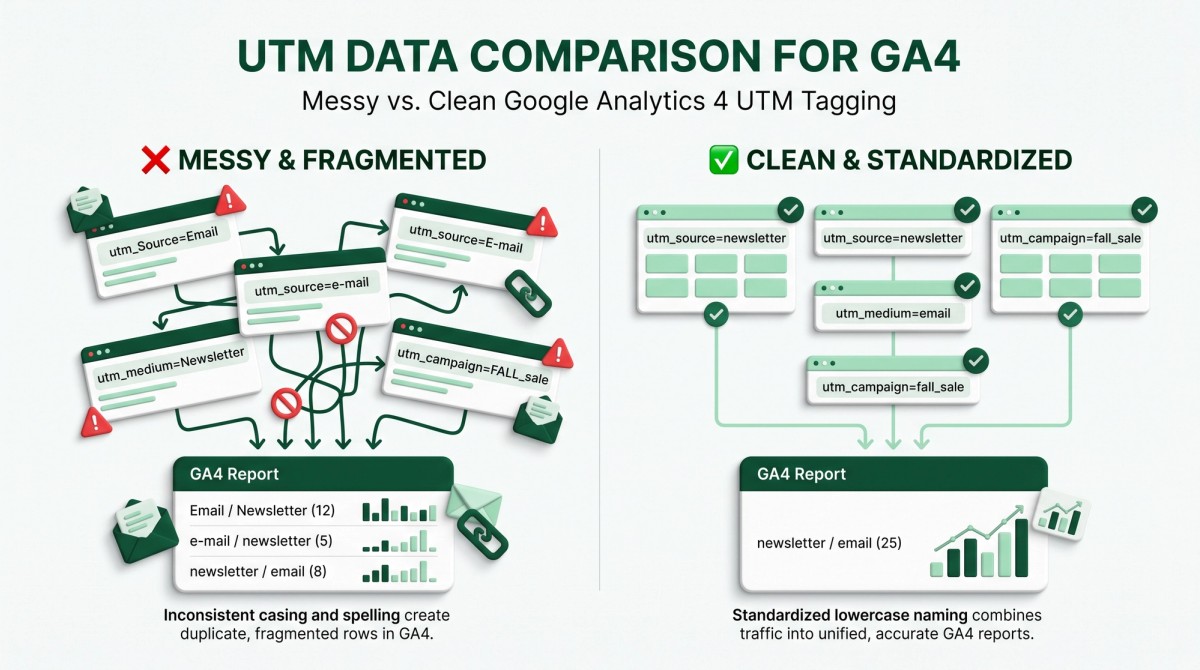
UTM tracking only becomes useful when your data follows a predictable structure.
Imagine your team runs the same campaign across Facebook, Instagram and email.
Without a naming convention, you might end up with:
Summer Sale summer-sale summer_sale Summer_Sale summerSale
These are different parameter values.
That means your reporting can become fragmented instead of showing one clean campaign.
A standardized naming system helps you:
- Compare campaigns more easily
- Filter GA4 reports faster
- Reduce manual reporting work
- Keep data consistent across team members
- Identify campaign performance accurately
- Build reliable dashboards
- Scale marketing without creating naming chaos
Where UTM Naming Conventions Are Useful
Use the same naming rules across:
- Email newsletters
- Facebook and Instagram campaigns
- LinkedIn campaigns
- Google Ads landing pages
- Influencer campaigns
- Affiliate links
- Partnership campaigns
- QR code campaigns
- Promotional landing pages
- Content marketing campaigns
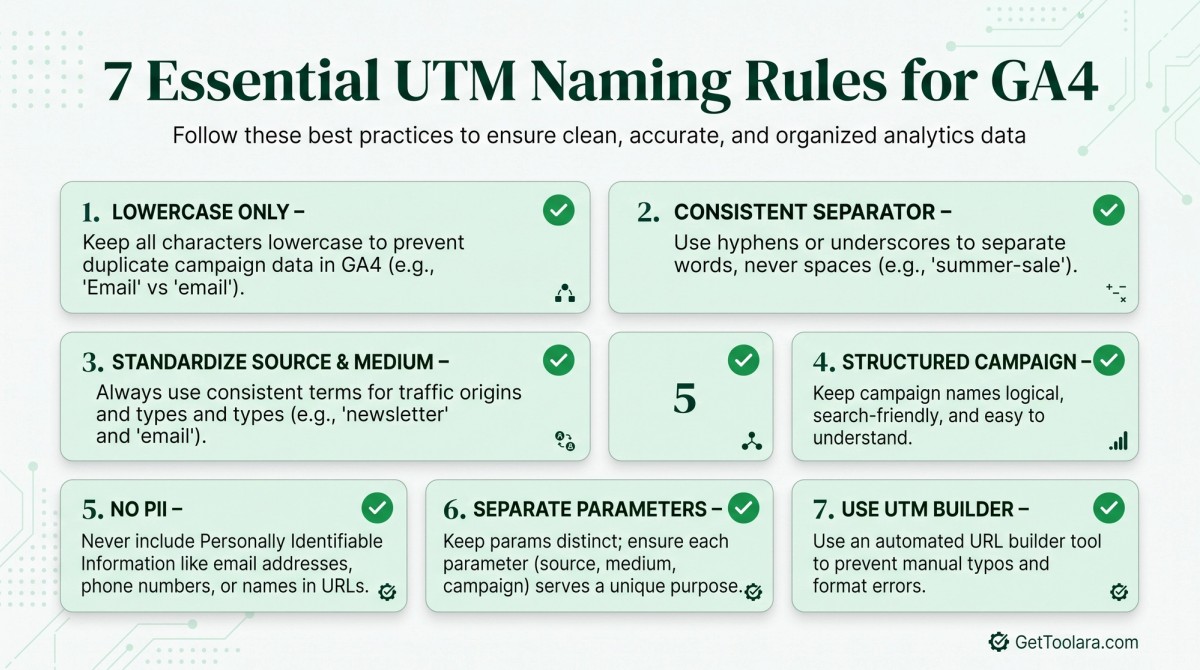
7 Essential UTM Naming Rules
Rule 1: Use Lowercase UTM Values
UTM values are case-sensitive.
For example:
utm_source=facebook
and:
utm_source=Facebook
are different values.
This can split what should be one traffic source into multiple rows in your reports.
Recommended
facebook instagram linkedin mailchimp google
Avoid
Facebook Instagram LinkedIn MailChimp Google
Best practice: Make lowercase your default rule for every UTM value.
Rule 2: Choose One Separator and Use It Consistently
Campaign names often contain multiple words.
For example:
summer_sale
or:
summer-sale
Both can work.
The important thing is consistency.
Don't use:
summer_sale summer-sale summer sale SummerSale
for different campaigns when they actually represent the same naming concept.
Recommended approach
Choose either:
Snake case
summer_sale black_friday_2026 new_product_launch
or:
Hyphens
summer-sale black-friday-2026 new-product-launch
Then document that choice and use it everywhere.
A Simple Naming Standard
For GetToolara-style marketing workflows, a practical standard is:
- Lowercase only
- No spaces
- Use one separator consistently
- Keep names descriptive
- Avoid unnecessary abbreviations
- Never include personal information
- Keep source, medium and campaign logically separat
Rule 3: Standardize utm_source and utm_medium
This is one of the most important parts of your UTM taxonomy.
utm_source
The source identifies where the traffic originated.
Examples:
facebook instagram linkedin mailchimp klaviyo google partner_blog
utm_medium
The medium describes the marketing method or channel.
Examples can include:
email social cpc referral
Your exact medium taxonomy should be documented for your organization rather than changed from campaign to campaign.
Google Analytics uses source and medium to help classify traffic and populate traffic-source reporting.
Example
utm_source=mailchimp utm_medium=email utm_campaign=summer_sale
This tells you:
- Source: Mailchimp
- Medium: Email
- Campaign: Summer Sale
Rule 4: Create a Structured utm_campaign
Your campaign name should tell you what marketing initiative the traffic belongs to.
Instead of:
utm_campaign=campaign1
use something meaningful:
utm_campaign=summer_sale
For a more structured system, you could use:
utm_campaign=product_channel_objective_period
For example:
utm_campaign=shoes_social_sales_q3
or:
utm_campaign=invoice_generator_launch_2026
The exact structure is less important than choosing one structure and using it consistently.
Example campaign framework
[product]_[channel]_[objective]_[period]
Example:
qr_generator_social_leads_q4
This makes campaign names easier to understand when you return to the data months later.
Rule 5: Never Put Personally Identifiable Information in UTMs
Never put personal information into UTM parameters.
For example, don't create URLs like:
utm_source=john@example.com
or:
utm_campaign=john_smith
if those values identify an individual.
Google's Analytics guidance specifically warns against sending personally identifiable information such as email addresses, phone numbers and names through campaign parameters including utm_source, utm_medium, utm_term, utm_campaign and utm_content.
Bad
utm_source=john@email.com
Better
utm_source=newsletter
Use campaign identifiers, audience categories or platform names rather than individual customer information.
Do not put:
- Email addresses
- Phone numbers
- Full names
- Customer IDs that identify individuals
- Other personally identifiable information
inside UTM parameters.
Use anonymous campaign labels instead.
Rule 6: Keep Source, Medium and Campaign Separate
A common UTM mistake is putting too much information into one parameter.
For example:
utm_source=facebook_paid_summer_sale
This mixes the platform, marketing method and campaign into one value.
A cleaner structure is:
utm_source=facebook utm_medium=cpc utm_campaign=summer_sale
Now each parameter has a clear job:
| Parameter | Meaning |
|---|---|
| Source | Where traffic came from |
| Medium | How traffic arrived |
| Campaign | Which marketing initiative generated it |
his makes filtering and comparing campaign data much easier.
Rule 7: Use a UTM Builder Instead of Creating URLs Manually
Manual UTM creation becomes error-prone when you're running many campaigns.
One person writes:
summer-sale
Another writes:
summer_sale
Someone else writes:
SummerSale
The campaign is the same, but your reporting now contains multiple values.
A UTM builder can make the process faster and reduce simple formatting mistakes.
With the GetToolara UTM Builder, you can create campaign URLs without manually constructing every query parameter.
A Simple UTM Naming Convention Template
Use this template as your starting point:
utm_source=<source> utm_medium=<medium> utm_campaign=<campaign> utm_content=<creative> utm_term=<keyword>
You don't always need every optional parameter.
For most campaigns, start with:
utm_source utm_medium utm_campaign
Google recommends using these core parameters when creating manually tagged campaign URLs.
UTM Naming Template
Source: lowercase platform or traffic source Medium: standardized marketing channel Campaign: lowercase campaign name Content: creative/link variation Term: paid keyword when applicable
Example:
- utm_source=instagram
- utm_medium=social
- utm_campaign=summer_sale
- utm_content=reel_01
UTM Naming Examples by Marketing Channel
Email Marketing
A clean email campaign might look like:
utm_source=mailchimp utm_medium=email utm_campaign=summer_sale
If you have multiple links in the same email:
utm_content=hero_cta
or:
utm_content=product_link
Google recommends using utm_content to distinguish different links or creative variations that point to the same destination.
Facebook Advertising
Example:
utm_source=facebook utm_medium=cpc utm_campaign=summer_sale utm_content=video_01
Example:
utm_source=instagram utm_medium=social utm_campaign=product_launch utm_content=reel_01
For paid campaigns, use the medium convention your organization has defined for paid traffic and apply it consistently.
Example:
utm_source=linkedin utm_medium=social utm_campaign=b2b_leads_q4 utm_content=carousel_01
Google Ads
If you're using Google Ads auto-tagging, don't manually replace or interfere with Google's auto-tagging setup unnecessarily.
For manually tagged campaigns where appropriate, a common structure is:
utm_source=google utm_medium=cpc utm_campaign=summer_sale utm_term=running_shoes
Google recommends auto-tagging for supported Google advertising integrations because it provides additional campaign information and reduces manual tagging work.
Don't Use UTMs on Your Own Internal Links
UTMs are primarily designed to identify marketing campaigns and external traffic sources.
You generally should not add campaign UTMs to normal internal links between pages on your own website.
For example, don't turn this:
gettoolara.com/invoice-generator
into an internal campaign URL like:
gettoolara.com/invoice-generator?utm_source=website&utm_medium=internal
unless you have a specific, carefully designed measurement reason.
Adding UTMs to internal navigation can overwrite or interfere with existing campaign attribution and make your traffic data harder to interpret.
Use normal internal links for navigation between your own pages.
Avoid mixing: Facebook , facebook , fb , facebook_ads.
when they all mean the same source.
Choose one approved value and document it.
Use utm_content for Creative Variations
If several links point to the same campaign, utm_content can help distinguish them.
For example:
utm_campaign=summer_sale utm_content=hero_banner
versus:
utm_campaign=summer_sale utm_content=footer_cta
This lets you compare which link or creative variation generated better results.
Google Analytics maps utm_content to the manual ad-content dimensions used in reporting.
Use utm_term for Keyword-Level Tracking
utm_term is traditionally used to identify paid keywords.
For example:
utm_term=running_shoes
Combined with:
utm_source=google utm_medium=cpc utm_campaign=summer_sale
you can create a more detailed campaign URL.
Don't use utm_term simply because you have an extra field available. Use it when keyword-level identification is actually useful for your campaign.
Consider utm_id for Campaign Identification
For larger marketing operations, utm_id can provide a stable identifier for a campaign.
Example:
utm_id=camp_2026_001 utm_campaign=summer_sale
This can be useful when connecting campaign data with other marketing or advertising datasets.
Google Analytics supports utm_id as the Campaign ID parameter.
Advanced GA4 Tip 💡
Don't assume that every UTM parameter requires a custom dimension.
GA4 already provides reporting dimensions for manually tagged values such as:
- Manual source
- Manual medium
- Manual campaign
- Manual term
- Manual ad content
Use Explorations or reporting tools when you need deeper analysis. Custom dimensions are more appropriate when you're collecting information that isn't already represented by GA4's standard dimensions.
Create a UTM Governance System
If you're working alone, a simple naming document may be enough.
If you're working with a marketing team, create a shared UTM governance document.
Your document can define approved values such as:
Sources
facebook instagram linkedin mailchimp klaviyo google
Mediums
email social cpc referral
Campaign Format
product_objective_period
Example:
qr_generator_leads_q4
This prevents every marketer from inventing their own terminology.
Keep a UTM Naming Convention Checklist
Before publishing a campaign URL, check:
Is everything lowercase?
Is the source clearly identified?
Is the medium standardized?
Is the campaign name meaningful?
Is the separator consistent?
Did you avoid spaces?
Did you avoid personal information?
Is utm_content needed?
Is utm_term relevant?
Is utm_id useful for this campaign?
Are you avoiding unnecessary UTMs on internal links?
Does the URL follow your team's naming convention?
Common UTM Naming Mistakes
1. Mixing Uppercase and Lowercase
Facebook facebook FACEBOOK
Fix: Use one lowercase value.
2. Changing Source Names
fb facebook facebook_ads meta
Fix: Define your approved source taxonomy.
3. Using Different Campaign Formats
summer-sale summer_sale SummerSale summerSale2026
Fix: Choose one structure.
4. Putting Everything in utm_source
utm_source=facebook_summer_sale_paid
Fix:
utm_source=facebook utm_medium=cpc utm_campaign=summer_sale
5. Adding Personal Information
utm_source=john_smith
Fix: Use an anonymous campaign or audience identifier.
6. Tagging Every Internal Link
Don't turn normal website navigation into campaign tracking URLs.
Use UTMs where they provide meaningful campaign attribution.
How GetToolara Can Help
Creating a consistent UTM system is easier when your team uses the same process every time.
With the GetToolara UTM Builder, you can create trackable campaign URLs without manually assembling every parameter.
You can use your naming convention while building URLs for:
- Social media
- Email marketing
- Paid campaigns
- Partnerships
- Content promotion
- Campaign landing pages
If you're new to UTM tracking, start with our guide: /blog/free-utm-builder
For social campaigns, see: /blog/utm-tracking-social-media
CTA GUIDE
Build Cleaner Campaign URLs
Stop creating UTM links manually.
Use the GetToolara UTM Builder to create consistent, trackable campaign URLs faster.
CTA: Create Your UTM URL
Link: Add your actual GetToolara UTM Builder tool URL here.
Final UTM Naming Convention
A good UTM naming system doesn't need to be complicated.
Start with these rules:
1.Use lowercase values
2.Choose one separator
3.Standardize source and medium
4.Use a structured campaign naming system
5.Never include PII
6.Keep source, medium and campaign separate
7.Use a UTM builder to reduce mistakes
The most important thing isn't finding the "perfect" naming convention.
It's creating a convention your marketing workflow can follow consistently.
When every campaign follows the same rules, your GA4 data becomes easier to understand, compare and use for better marketing decisions.
Frequently Asked Questions
What is a UTM naming convention?+
Should UTM parameters be lowercase?+
Should I use underscores or hyphens in UTM campaigns?+
What should utm_source contain?+
What should utm_medium contain?+
Should I use UTM parameters on internal links?+
Can I put an email address in a UTM parameter?+
What are the most important UTM parameters?+
Can a UTM naming convention improve GA4 reporting?+
Ready to put these UTM naming rules into practice?
Try GetToolara Free UTM Builder